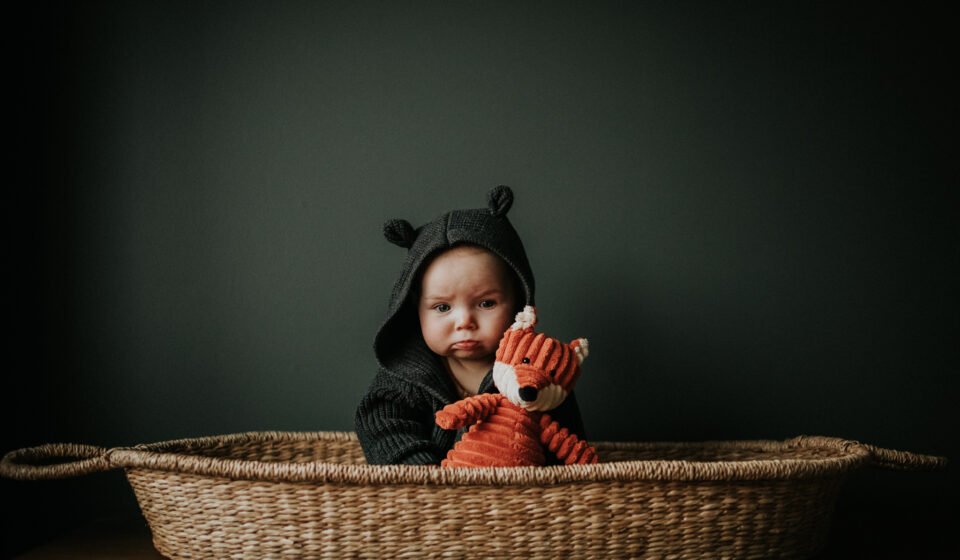

Have you ever looked at a photo that felt mysterious, quiet, and bold all at the same time? That is the power of a dark image. While many people try to make their photos as bright as possible, there is a special kind of beauty in the shadows. Taking a dark image isn’t about making a mistake in the dark; it is about using low light to tell a deep story. It makes the viewer lean in and look closer at the details hiding in the corners.
When I first started playing with my camera, I was scared of shadows. I thought every part of the picture needed to be clear. But then, I captured a dark image of a single candle in a room, and everything changed. The way the light hugged the edges of the table made the scene feel like a movie. In this guide, we will talk about how you can use a dark image to show emotion and create art that people will remember for a long time.
Why Shadows Matter in Photography
Shadows are not just empty spaces. In a dark image, shadows are just as important as the light. They help create shapes and give the photo a 3D feeling. If everything is bright, the picture can look flat and boring. By choosing to keep parts of your frame as a dark image, you highlight the most important subject. It’s like using a spotlight on a stage; the darkness around the actor makes them stand out more.
Using a dark image style is often called “low-key photography.” This style uses high contrast. This means there is a big difference between the brightest spot and the darkest spot. When you master the dark image, you stop just taking “pictures” and start creating “moods.” Whether it is a rainy window or a person sitting by a lamp, these deep tones make your work look professional and thoughtful.
Finding the Best Light for a Dark Image
You might think you need a pitch-black room to get a good dark image, but that isn’t true. You actually need a little bit of very “strong” light. Think about a single window in a dark hallway or a small desk lamp. This light should hit your subject from the side. This creates a dark image with beautiful highlights on one side and deep, rich shadows on the other. This is often called “side lighting,” and it is a favorite trick for experts.
I love using natural light during the “blue hour,” which is just after the sun goes down. The light is soft and cool, making it easy to snap a dark image without any harsh glares. If you are inside, try turning off all the overhead lights. Use a small flashlight or even your phone screen to light up just one part of your subject. This controlled light is the secret sauce for a high-quality dark image.
Essential Camera Settings for Low Light
To get a crisp dark image, you need to tell your camera what to do. If you leave it on “Auto,” the camera will try to make everything bright, which ruins the mood. First, try lowering your ISO. A low ISO, like 100 or 200, keeps the dark image looking smooth instead of grainy. If the ISO is too high, the black parts of your photo will look “noisy” or “dotty,” which doesn’t look very nice.
Next, look at your shutter speed. Since you are taking a dark image, your camera needs a moment to “see” the light. You might need to hold the camera very still or use a tripod. If you move even a little bit, your dark image will look blurry. Lastly, adjust your aperture. A wide aperture (a low number like f/1.8 or f/2.8) lets in just enough light to keep the subject sharp while the background stays as a beautiful dark image.
How to Edit and Enhance Your Dark Image
Editing is where the real magic happens for a dark image. When you open your photo in an app, don’t just turn the brightness down. Instead, look for the “Blacks” and “Shadows” sliders. Pulling these down will make your dark image feel much deeper and more intense. You want the dark areas to feel heavy but still have a little bit of detail so they don’t look like big black holes.
Another great tip is to increase the “Contrast.” This makes the bright parts pop against the dark image background. I also like to add a “Vignette,” which makes the edges of the photo darker. This pulls the viewer’s eye right to the center of your dark image. Remember, less is more! You don’t want to over-edit. You want the photo to look like a natural, moody moment captured in time.
The Best Subjects for a Moody Dark Image
Not every subject looks great in the dark, but some are perfect for a dark image. People’s faces are a classic choice. A “low-key” portrait can show a lot of character and emotion. Another great idea for a dark image is still-life objects, like an old book, a piece of fruit, or a flower. The textures of these items really show up when the light is dim and focused.
Architecture can also make for a powerful dark image. Think about old buildings, narrow alleys, or staircases with one light at the top. Even pets can be great subjects! My cat often sits in a sunbeam in a dark room, and it makes for the perfect dark image every time. Look for things with interesting textures or shapes. Anything that can catch a little bit of light while staying mostly hidden is a winner.
Using Color to Improve Your Dark Image
Even though we call it a dark image, color plays a huge role. Deep blues, dark greens, and rich reds look amazing in low light. If you want a warm feeling, use orange or yellow light sources. If you want a cold, sad, or mysterious dark image, stick with blue tones. Sometimes, turning a dark image into black and white is the best choice because it focuses entirely on the light and the shapes.
When I take a dark image, I often look at the “White Balance” settings. This changes how “warm” or “cool” the colors appear. A slightly blue dark image can feel like a cold winter night. A slightly orange one feels like a cozy fireplace. Experimenting with these colors helps you tell a better story. Don’t be afraid to let the colors be dark and desaturated to keep the focus on the mood.
Common Mistakes to Avoid in Dark Photography
One big mistake is making the whole photo a dark image with no light at all. If there is no light, there is no picture! You always need at least one small highlight to guide the eye. Another mistake is “clipping” your blacks. This happens when the dark image is so dark that all the detail is lost forever. You can check your camera’s histogram to make sure you aren’t losing too much information.
Avoid using a direct flash from your camera. A front-facing flash will hit the subject too hard and get rid of all the shadows you worked so hard to create. Instead of a moody dark image, you will get a flat, bright, and boring photo. If you must use a flash, bounce it off a wall or use a diffuser. Keeping the light soft is the key to maintaining that beautiful dark image aesthetic.
Pro Tips for Mobile Phone Users
You don’t need a fancy $2,000 camera to take a great dark image. Most modern smartphones are actually very good at this! The secret is to tap on the brightest part of your screen before you take the photo. On an iPhone or Android, you can then slide your finger down to lower the exposure. This tells the phone to create a dark image instead of trying to brighten the room.
There are also many apps like Lightroom Mobile that give you “Pro” controls. These allow you to change the shutter speed and ISO just like a big camera. When taking a dark image on a phone, try to keep your hands very steady. Lean against a wall or a table to prevent shaking. You will be surprised at how professional your dark image can look with just a few simple taps on your screen.
Creative Projects: Starting Your Own Dark Image Series
A fun way to learn is to start a project. Why not try taking one dark image every day for a week? You could focus on different themes, like “Kitchen Shadows” or “Night Lights.” This helps you train your eyes to see the world differently. Soon, you won’t just see a dark room; you will see a canvas for your next dark image masterpiece.
You can also share your work online. Many people love the “dark aesthetic” on social media. Using a consistent dark image style can make your profile look very clean and artistic. Don’t worry about being perfect at first. Every dark image you take is a lesson. The more you practice, the more you will understand how light works and how to control it to get exactly the look you want.
Biography: The Masters of Light and Shadow
| Feature | Details |
| Common Name | Low-Key Photography / Chiaroscuro |
| Famous Artist | Caravaggio (Painter), Ansel Adams (Photographer) |
| Key Elements | High Contrast, Deep Shadows, Single Light Source |
| Modern Uses | Film Noir, Fine Art, Luxury Branding, Social Media Aesthetics |
| Best Tools | Tripods, Prime Lenses, Editing Software (Lightroom/Photoshop) |
| Emotional Impact | Mystery, Drama, Elegance, Intimacy |
Conclusion: Embrace the Beauty of the Dark
Taking a dark image is a journey into the quiet side of art. It teaches us that we don’t always need to see everything to feel something. By using shadows, careful lighting, and the right camera settings, you can turn a simple moment into a powerful story. Whether you are using a professional camera or your smartphone, the rules of a great dark image stay the same: find the light, protect the shadows, and keep it simple.
I hope this guide helps you feel confident the next time you find yourself in a dim room. Don’t turn the lights on right away! Instead, grab your camera and see if you can capture a dark image that speaks to you. Remember to keep practicing and, most importantly, have fun exploring the mystery of the dark. What will you photograph first?
Frequently Asked Questions (FAQs)
1. What exactly is a dark image in photography?
A dark image, often called low-key photography, is a style where most of the photo is in shadow. It uses high contrast and a small amount of light to create a moody, dramatic, or mysterious feeling.
2. Do I need a tripod to take a dark image?
While not always required, a tripod is very helpful. Since there is less light, your camera needs more time to take the picture. A tripod keeps the camera perfectly still so your dark image stays sharp and not blurry.
3. Why does my dark image look grainy?
Graininess (or noise) usually comes from having an ISO that is too high. To keep your dark image looking clean, try to keep your ISO low and use a longer shutter speed or a wider aperture instead.
4. Can I take a dark image during the day?
Yes! You can create a dark image during the day by using “negative fill” (blocking light with black boards) or by shooting in a room with only one small window. You can also use a fast shutter speed to “kill” the ambient light.
5. What are the best apps for editing a dark image?
Adobe Lightroom and Snapseed are excellent for mobile users. If you are on a computer, Photoshop and Lightroom are the industry standards for fine-tuning the shadows and blacks in your dark image.
6. Is a dark image the same as an underexposed photo?
Not quite. An underexposed photo is often a mistake where everything is too dark to see. A professional dark image is a deliberate choice where the shadows are dark, but the subject is perfectly lit and clear.